- Posts: 170
- Thank you received: 153

Pilatus PT6 Turbo Porter - Renovation
- throttletothewall
-
 Topic Author
- Offline
- Senior Member
-

Less
More
07 Mar 2018 21:19 #15914
by throttletothewall
Replied by throttletothewall on topic Pilatus PT6 Turbo Porter - Renovation
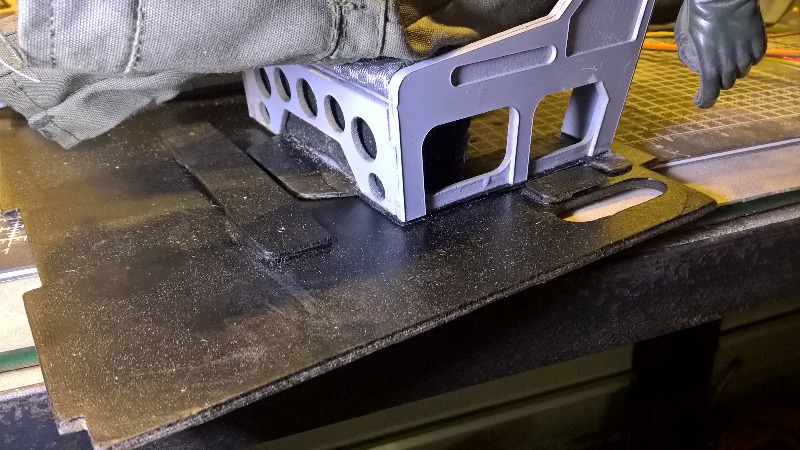
The pilot seats had been glued to the 'removable' floor to the cockpit but when I had tried to remove the floor the seats/pilots/floor could not be removed whilst the seats were still glued in place. As I am going to be installing the iTrap and some of the fuel tubing/cabling below this floor I need to make the pilots/seats easily removable but there is not easy access to fit/remove several screws to achieve this. So I devised a tongue and box system on the front and outer side of each seat and then just one screw for each seat in the centre to hold them all in place . this means both seats and the floor can be removed by taking out just three screws, all of which are easily accessible from the top hatch.


The following user(s) said Thank You: kevinross
Please Log in or Create an account to join the conversation.
- throttletothewall
-
Topic Author
- Offline
- Senior Member
-
Less
More
- Posts: 170
- Thank you received: 153
07 Mar 2018 21:36 #15915
by throttletothewall
Replied by throttletothewall on topic Pilatus PT6 Turbo Porter - Renovation
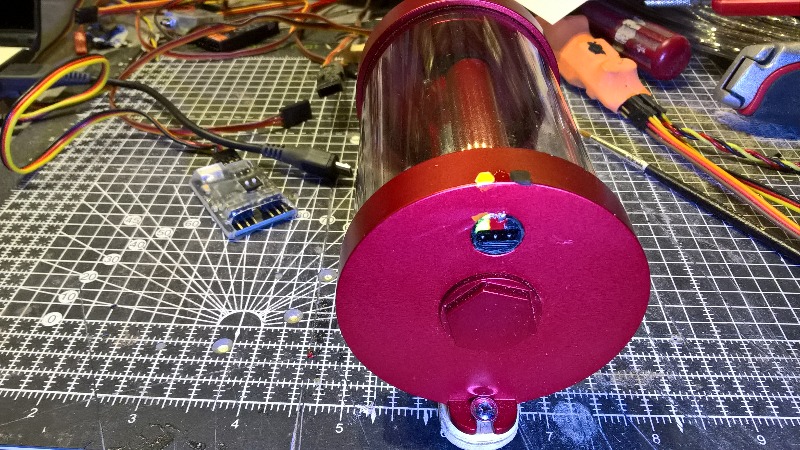
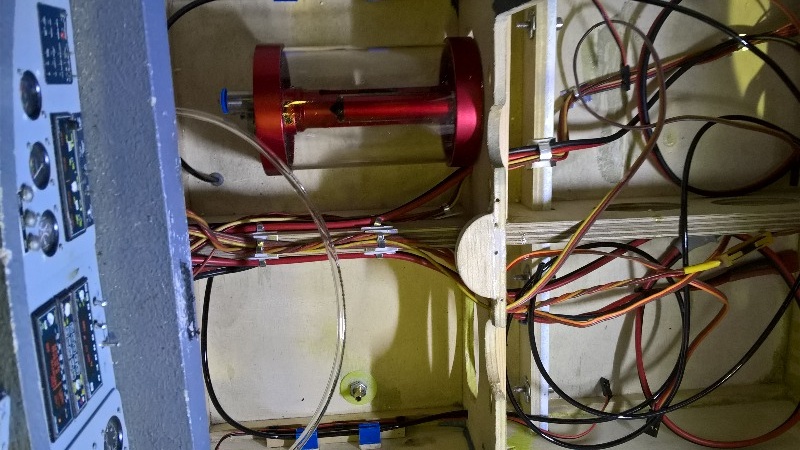
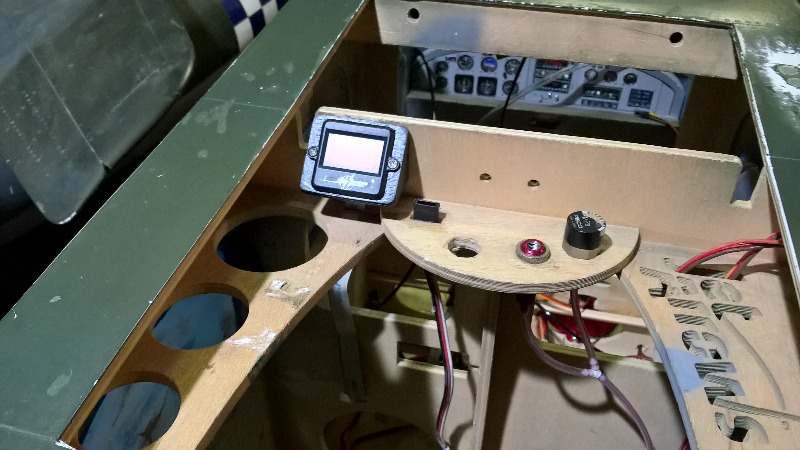
Today I have been aligning and securing all the wiring, air tubing and fuel tubing that passes under the cockpit floor and arranging the lighting controller, air valves and iTrap telemetry electronics on the Powerbox plate that sits above the main tanks. I have also made up the mounting plate and fixed the iTrap to the floor under the cockpit. I checked the iTrap instructions as the socket for the telemetry electronics does not have any plug polarisation so I knew that sooner or later the plug would be put in the wrong way round, given that it is going to be quite deep down in the cockpit and access for the plug is through a small hole cut in a former. So I painted some colour coding on the socket and the top edge of the iTrap to make sure that I do not make that mistake if undertaking some maintenance several months/years down the line.

The following user(s) said Thank You: kevinross
Please Log in or Create an account to join the conversation.
- throttletothewall
-
Topic Author
- Offline
- Senior Member
-
Less
More
- Posts: 170
- Thank you received: 153
15 Mar 2018 21:21 #16003
by throttletothewall
Replied by throttletothewall on topic Pilatus PT6 Turbo Porter - Renovation
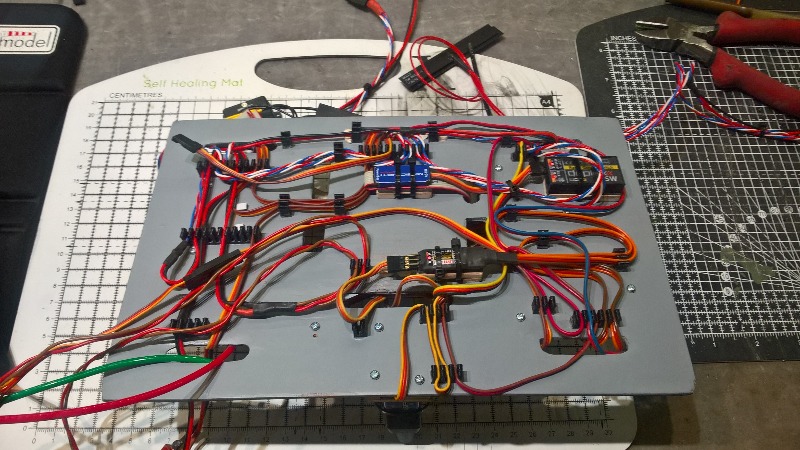
Well has been quite a week, I have spent three days mounting as much of the electronics that I can on the removable radio tray.
My logic is that I want to do as much of the commissioning and setting up as possible out of the model . I know there will be lots of plugging in and unplugging of servo plugs etc. as I connect everything up and set up the failsafe, giro, output mapping, failsafe, Rx redundancy, brake valves and lighting.This has already proved a correct logic, more of that later.
Wherever possible I have made little mounting plates for Satellite Rxs and telemetry electronics etc. I do not want to use double sided tape or Velcro to mount these but I do want them to be securely mounted. By using the mounts with a thin layer of rubber seal on top the electronics can be securely mounted using tie wraps and they are easily removable if required.
There has been lots of head scratching about the best place to mount various items and the board has been gradually built up through the week. See pic sequence.
My logic is that I want to do as much of the commissioning and setting up as possible out of the model . I know there will be lots of plugging in and unplugging of servo plugs etc. as I connect everything up and set up the failsafe, giro, output mapping, failsafe, Rx redundancy, brake valves and lighting.This has already proved a correct logic, more of that later.
Wherever possible I have made little mounting plates for Satellite Rxs and telemetry electronics etc. I do not want to use double sided tape or Velcro to mount these but I do want them to be securely mounted. By using the mounts with a thin layer of rubber seal on top the electronics can be securely mounted using tie wraps and they are easily removable if required.
There has been lots of head scratching about the best place to mount various items and the board has been gradually built up through the week. See pic sequence.


Please Log in or Create an account to join the conversation.
- throttletothewall
-
Topic Author
- Offline
- Senior Member
-
Less
More
- Posts: 170
- Thank you received: 153
15 Mar 2018 21:57 #16004
by throttletothewall
Replied by throttletothewall on topic Pilatus PT6 Turbo Porter - Renovation
I have spent the last two days trying to get the three Tx RF modules - 2 x 2.4Ghz + 1 x 900Mhz talking to the various Rxs and then getting the Rxs to talk to the Powerbox Rx inputs. THIS HAS NOT BEEN EASY!!!!
The first problem was that the Powerbox instructions did not tell me what the plug orientation was for the Rx input (The servo outputs had the little JR corner pieces to orientate the plugs but the Rx & tele sockets did not). I eventually found something online on one of the forums to resolved this, I didn’t want to blow a rather expensive Powerbox by getting plugs in the wrong way round before I had even started the setup!
I have had to change the outputs of the Satellite Rxs to a sort of serial output called UDi so that all channels can pass into the Powerbox, I also had to set the Powerbox up to read UDi at the input. The main 2.4Ghz Satellite Rx plugs into the Rx1 input of the Powerbox and I got that working, eventually, to drive a servo on channel 1. I then got the other two Rxs set up and plugged them in one at a time to the Rx2 input to the Powerbox. The 2.4 Ghz satellite worked fine and unplugging one or the other did not cause the signal to be lost and the Tx telemetry told me that it had gone to backup Rx, great!
However, the 900Mhz Satellite Rx needed output pins remapping to get it to work. Easy when you know how but again hours on forums and wading through manuals to find the right information. Then the problems really started, as the Powerbox only has two Rx inputs the second 2.4 Ghz Rx and the 900Mhz Rx have to be combined via a unit called an Enlink2. This unit is designed to let two separate Rxs (and power supplies) drive one servo and can combine two Rx signals on the basis of the best signal (failsafe has to be turned off on the Rxs to ensure the output goes null if the signal fails. (Failsafe is set up in the Powerbox but needs a null input to understand that the signal has been lost on all the Rxs)
Anyway to cut a long story short I have still not got this working but believe I have at last identified the problem after many hours on forums. The Enlink2 comes with two different versions of firmware, one to drive a servo (the standard retailed version of Enlink2) and another version of the software to combine PPM/UDI/serial signals. This will mean I have to download and flash the PPM firmware into the Enlink2 to get the UDi signals through to the Powerbox. I now await the USB adaptor to try and do this. So Watch this Space!!!
The first problem was that the Powerbox instructions did not tell me what the plug orientation was for the Rx input (The servo outputs had the little JR corner pieces to orientate the plugs but the Rx & tele sockets did not). I eventually found something online on one of the forums to resolved this, I didn’t want to blow a rather expensive Powerbox by getting plugs in the wrong way round before I had even started the setup!
I have had to change the outputs of the Satellite Rxs to a sort of serial output called UDi so that all channels can pass into the Powerbox, I also had to set the Powerbox up to read UDi at the input. The main 2.4Ghz Satellite Rx plugs into the Rx1 input of the Powerbox and I got that working, eventually, to drive a servo on channel 1. I then got the other two Rxs set up and plugged them in one at a time to the Rx2 input to the Powerbox. The 2.4 Ghz satellite worked fine and unplugging one or the other did not cause the signal to be lost and the Tx telemetry told me that it had gone to backup Rx, great!
However, the 900Mhz Satellite Rx needed output pins remapping to get it to work. Easy when you know how but again hours on forums and wading through manuals to find the right information. Then the problems really started, as the Powerbox only has two Rx inputs the second 2.4 Ghz Rx and the 900Mhz Rx have to be combined via a unit called an Enlink2. This unit is designed to let two separate Rxs (and power supplies) drive one servo and can combine two Rx signals on the basis of the best signal (failsafe has to be turned off on the Rxs to ensure the output goes null if the signal fails. (Failsafe is set up in the Powerbox but needs a null input to understand that the signal has been lost on all the Rxs)
Anyway to cut a long story short I have still not got this working but believe I have at last identified the problem after many hours on forums. The Enlink2 comes with two different versions of firmware, one to drive a servo (the standard retailed version of Enlink2) and another version of the software to combine PPM/UDI/serial signals. This will mean I have to download and flash the PPM firmware into the Enlink2 to get the UDi signals through to the Powerbox. I now await the USB adaptor to try and do this. So Watch this Space!!!


Please Log in or Create an account to join the conversation.
- JRI
-

- Offline
- Platinum Member
-

Less
More
- Posts: 502
- Thank you received: 108
16 Mar 2018 08:56 #16005
by JRI
Replied by JRI on topic Pilatus PT6 Turbo Porter - Renovation
Hi Pete, where does the 900MHz frequency come into the equation? Are you using 2.4GHz and 900MHz outputs from the same transmitter?
Please Log in or Create an account to join the conversation.
- Phil Ford
-

- Offline
- Moderator
-

Less
More
- Posts: 3156
- Thank you received: 903
16 Mar 2018 11:44 #16008
by Phil Ford
Replied by Phil Ford on topic Pilatus PT6 Turbo Porter - Renovation
I think your idea of equipment mounted on "modules" is the best method. That way an item can retrieved from the plane without dismantling a plethoria of gear and and then trying to remember what went where. 
Please Log in or Create an account to join the conversation.
- throttletothewall
-
Topic Author
- Offline
- Senior Member
-
Less
More
- Posts: 170
- Thank you received: 153
16 Mar 2018 23:01 #16019
by throttletothewall
Replied by throttletothewall on topic Pilatus PT6 Turbo Porter - Renovation
John,
Yes the Jeti DS24 Tx has 2 x 2.4Ghz RF modules that talk alternately to each of the 2.4 Ghz Rxs with one Rx being the primary and the other as a backup. However, if the 2.4Ghz spectrum has a total wipeout with severe interference then the Tx also has a 900Mhz (actually 863-870Mhz) RF module that is talking to the 900Mhz Rx (but less frequently) which can take over if 2.4Ghz comms is lost due to the interference or severe signal blocking.
Yes the Jeti DS24 Tx has 2 x 2.4Ghz RF modules that talk alternately to each of the 2.4 Ghz Rxs with one Rx being the primary and the other as a backup. However, if the 2.4Ghz spectrum has a total wipeout with severe interference then the Tx also has a 900Mhz (actually 863-870Mhz) RF module that is talking to the 900Mhz Rx (but less frequently) which can take over if 2.4Ghz comms is lost due to the interference or severe signal blocking.
Please Log in or Create an account to join the conversation.
- DaveBright
-

- Offline
- Moderator
-
Less
More
- Posts: 886
- Thank you received: 129
17 Mar 2018 07:35 #16021
by DaveBright
Replied by DaveBright on topic Pilatus PT6 Turbo Porter - Renovation
And if 2.4Ghz and 900Mhz is taken out there’s probably a nuclear explosion fairly close by so more pressing things to worry about than model failsafe!  I do like the idea of this massive signal resilience.
I do like the idea of this massive signal resilience. Please Log in or Create an account to join the conversation.
- MikeSeale
-

- New Member
-

Less
More
- Thank you received: 0
17 Mar 2018 08:37 #16025
by MikeSeale
Replied by MikeSeale on topic Pilatus PT6 Turbo Porter - Renovation
Jeti aren't the only ones with this kind of built in redundancy for when the communication is lost. But their implementation is a little neater than that offered by Orange RC

Please Log in or Create an account to join the conversation.
- throttletothewall
-
Topic Author
- Offline
- Senior Member
-
Less
More
- Posts: 170
- Thank you received: 153
18 Mar 2018 19:42 #16069
by throttletothewall
Replied by throttletothewall on topic Pilatus PT6 Turbo Porter - Renovation
John McNamara of ‘Jettstream’ sorted me a USB lead for updating Jeti Firmware and put it in the post to me first class.
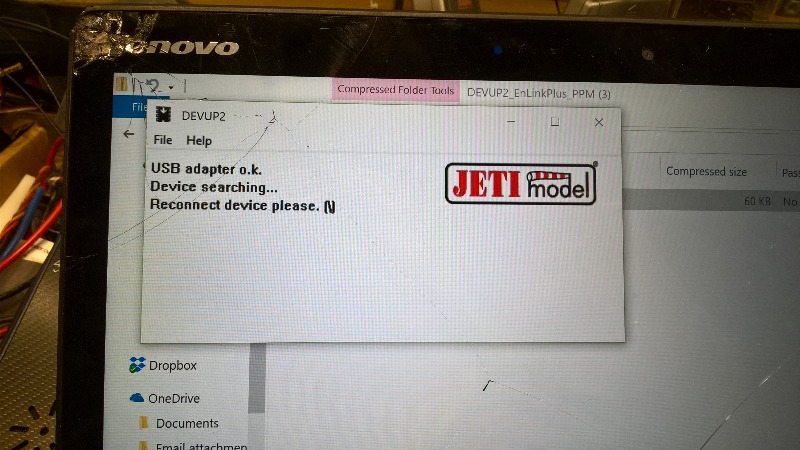
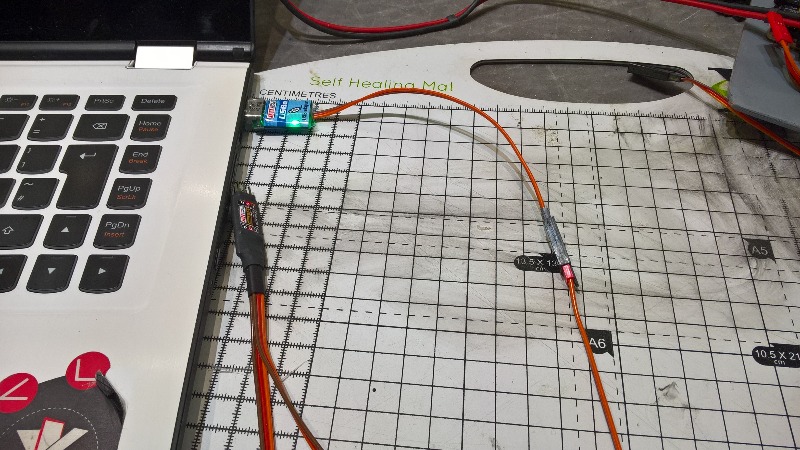
So today I have tried to flash the Enlink 2 electronics with the PPM firmware. The instructions from Jeti just say use the Ext. port for updating but the Enlink2 does not have an identifiable Ext. port and there is nothing anywhere on the web about which of the four possible connections to use, or is the Ext. port.
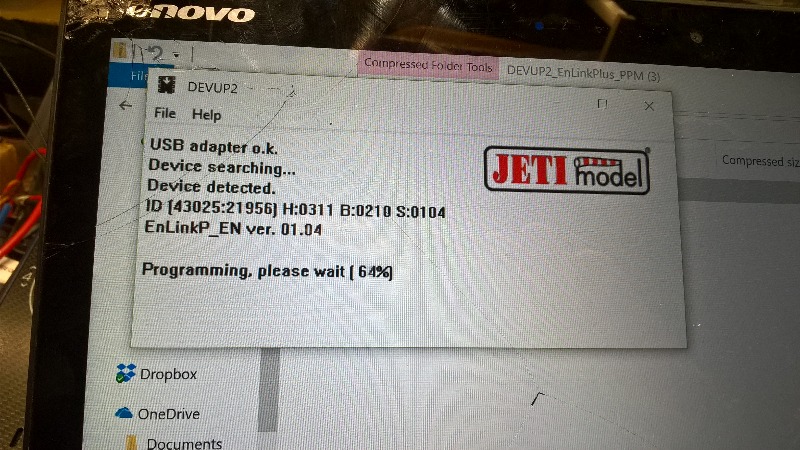
Having downloaded the drivers for the USB and the update software for the PPM firmware, I tried every possible port on the Enlink2 but the update software just kept searching for the ‘device’. I sat down and crafted a long email to John McNamara and pressed send, then thought I would try one last time and discovered that I had to wait for the update software to run and start looking for the ‘device’ before actually connecting it, then it would find the device and do the update automatically.
I then rushed out to the workshop to flash the firmware to the other Enlink2 I had installed on the PT6 radio tray, reconnected everything and tried the two standby receivers through the Enlink2 to the Powerbox.
Wow - it now all works! Unplugging any two of the three receivers allows the Powerbox to continue operating the servo. Even more importantly there is no noticeable latency when the Powerbox/servo is being operated on the 900Mhz receiver only.
Now all I have to do is assign all the output sockets on the Powerbox and then programming the Jeti Tx and Powerbox for the various mixes I want and to set up the failsafe operation in the Powerbox. I dare say that this will entail a lot more searching on the web when I cannot find how to do certain mixes etc or things do not go quite as planned but the light at the end of the tunnel is now beginning to show a little now.
So today I have tried to flash the Enlink 2 electronics with the PPM firmware. The instructions from Jeti just say use the Ext. port for updating but the Enlink2 does not have an identifiable Ext. port and there is nothing anywhere on the web about which of the four possible connections to use, or is the Ext. port.
Having downloaded the drivers for the USB and the update software for the PPM firmware, I tried every possible port on the Enlink2 but the update software just kept searching for the ‘device’. I sat down and crafted a long email to John McNamara and pressed send, then thought I would try one last time and discovered that I had to wait for the update software to run and start looking for the ‘device’ before actually connecting it, then it would find the device and do the update automatically.
I then rushed out to the workshop to flash the firmware to the other Enlink2 I had installed on the PT6 radio tray, reconnected everything and tried the two standby receivers through the Enlink2 to the Powerbox.
Wow - it now all works! Unplugging any two of the three receivers allows the Powerbox to continue operating the servo. Even more importantly there is no noticeable latency when the Powerbox/servo is being operated on the 900Mhz receiver only.
Now all I have to do is assign all the output sockets on the Powerbox and then programming the Jeti Tx and Powerbox for the various mixes I want and to set up the failsafe operation in the Powerbox. I dare say that this will entail a lot more searching on the web when I cannot find how to do certain mixes etc or things do not go quite as planned but the light at the end of the tunnel is now beginning to show a little now.
Please Log in or Create an account to join the conversation.
Moderators: DaveBright
Time to create page: 0.378 seconds
©
2009 - 2026
WMAC PCF Design