- Posts: 3156
- Thank you received: 903

Open TX
- Phil Ford
-
 Topic Author
- Offline
- Moderator
-

Less
More
24 Oct 2017 18:53 #14375
by Phil Ford
Replied by Phil Ford on topic Open TX
I have spent most of the day playing with the S8R. Got it bound but using SXR Config V1.8, the latter appeared not to write to RX. This set me back a bit so download Ver1. That worked and I was able to calibrate the gyro. I then executed the Lua script on the TX and this time it found it first time, calibrated it, etc. 
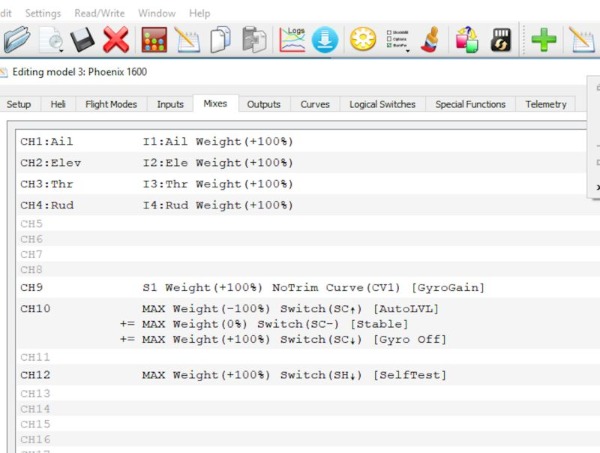
Now this is where I got lost a bit. You have to assign a switch to activate the stabiliser. Further switch movements can be assigned to modes of stabilisation. i have watched loads of videos and read tutorials but what is missing is how to assign channels. The manual says CH12 to activate and using channels like 10 & 11 for modes. My questions is do I initialise these Channels in Inputs and to what? MAX? Then switches need to be set up in Mixes I assume. I do get a list of Switches and L's and Lua's. But which of the latter is mine? Spent ages on this and finally gave it a rest/
Vario. Plug into Smart Port. LED flashing, discover new sensor on the TX and there it is and works. However, setting up the screen to display and speak altitude/speed I cannot find on the TX and a tutorial I was following seems to have a different Telemetry screen to the one I have in Companion 2.2.
All good fun ain't it.
Going flying tomorrow hopefully, I need a break.:lol:
Now this is where I got lost a bit. You have to assign a switch to activate the stabiliser. Further switch movements can be assigned to modes of stabilisation. i have watched loads of videos and read tutorials but what is missing is how to assign channels. The manual says CH12 to activate and using channels like 10 & 11 for modes. My questions is do I initialise these Channels in Inputs and to what? MAX? Then switches need to be set up in Mixes I assume. I do get a list of Switches and L's and Lua's. But which of the latter is mine? Spent ages on this and finally gave it a rest/
Vario. Plug into Smart Port. LED flashing, discover new sensor on the TX and there it is and works. However, setting up the screen to display and speak altitude/speed I cannot find on the TX and a tutorial I was following seems to have a different Telemetry screen to the one I have in Companion 2.2.
All good fun ain't it.
Going flying tomorrow hopefully, I need a break.:lol:
Please Log in or Create an account to join the conversation.
- Chris001
-

- New Member
-

Less
More
- Thank you received: 0
01 Nov 2017 20:02 #14473
by Chris001
Replied by Chris001 on topic Open TX
Just updated to OTX 2.2, so far so good, actually it was surprisingly easy, I did the boot loader as well I can't honestly see any real difference between 2.1.9 and 2.2
I'm thinking of shifting a coupe of switches too, my momentary switch, which I use to give me a 'time left' is on the right hand side, and I think the left would be better.
I can't honestly see any real difference between 2.1.9 and 2.2I'm thinking of shifting a coupe of switches too, my momentary switch, which I use to give me a 'time left' is on the right hand side, and I think the left would be better.
Please Log in or Create an account to join the conversation.
- Phil Ford
-
Topic Author
- Offline
- Moderator
-
Less
More
- Posts: 3156
- Thank you received: 903
01 Nov 2017 23:15 - 01 Nov 2017 23:17 #14475
by Phil Ford
Replied by Phil Ford on topic Open TX
2.2 allows you to program the Gyro receivers S6R/S8R using in built lua scripts. Don't necessarily need the Companion. I have used both systems and appear to work just fine. Going to maiden Fox on Thursday (hopefully if I don't forget the wing bolts)using the Taranis and various modules.
I am still using the 1.6.xx bootloader
Sample of my otx file attached
I am still using the 1.6.xx bootloader
Sample of my otx file attached
Last edit: 01 Nov 2017 23:17 by Phil Ford.
Please Log in or Create an account to join the conversation.
- Chris001
-
- New Member
-
Less
More
- Thank you received: 0
02 Nov 2017 08:57 #14476
by Chris001
 My reason for updating is to allow for a future hardware update.
Good luck with the Fox maiden, this is the Fly Fly model isn't it?
Regarding the bootloader, I don't think it's as important to keep it up to date, but it's very easy to do so why not.
The bootloaded is in the OTX firmware build you downloaded via Companion, the only slight annoyance is you need to truncate the name, so I went from:
opentx-x9e-eu-noheli-lua-en-2.2.0.bin to 2.2.0.bin
Just drop that into the Firmware folder on the TX SD card. Power up the TX, long duration button press on Menu, go to Page 2, go to [Firmware] scroll down to "2.2.0.bin" press enter and choose "Flash Bootloader" Done. And writing it out makes it look more complicated than it is.
Replied by Chris001 on topic Open TX
Thanks Phil, I didn't know thatPhilF51 wrote: 2.2 allows you to program the Gyro receivers S6R/S8R using in built lua scripts.
My reason for updating is to allow for a future hardware update.Good luck with the Fox maiden, this is the Fly Fly model isn't it?
Regarding the bootloader, I don't think it's as important to keep it up to date, but it's very easy to do so why not.
The bootloaded is in the OTX firmware build you downloaded via Companion, the only slight annoyance is you need to truncate the name, so I went from:
opentx-x9e-eu-noheli-lua-en-2.2.0.bin to 2.2.0.bin
Just drop that into the Firmware folder on the TX SD card. Power up the TX, long duration button press on Menu, go to Page 2, go to [Firmware] scroll down to "2.2.0.bin" press enter and choose "Flash Bootloader" Done. And writing it out makes it look more complicated than it is.
Please Log in or Create an account to join the conversation.
- Phil Ford
-
Topic Author
- Offline
- Moderator
-
Less
More
- Posts: 3156
- Thank you received: 903
02 Nov 2017 19:38 - 02 Nov 2017 19:52 #14480
by Phil Ford
Replied by Phil Ford on topic Open TX
Thanks Chris, My bootloader is 2.1.6. although it's not a critical item unless they make significant changes to the firmware I imagine. I will do the Flash when I have twiddled with the Vario special functions to stop that annoying beep if switch is not in the right position. Fox went well today - ideal skies except for no lift and no wind to cut across. See post for Thursday 2nd Nov.
My firmware is - opentx-x9d+-eu-lua-sqt5font-en.bin
My firmware is - opentx-x9d+-eu-lua-sqt5font-en.bin
Last edit: 02 Nov 2017 19:52 by Phil Ford.
Please Log in or Create an account to join the conversation.
- Phil Ford
-
Topic Author
- Offline
- Moderator
-
Less
More
- Posts: 3156
- Thank you received: 903
04 Nov 2017 09:56 #14494
by Phil Ford
Replied by Phil Ford on topic Open TX
Well finally! Got my S8R receiver to work as a Gyro/Stabiliser. I finally twigged that the dedicated channels 10 & 11 do not need to be assigned by me, they are already spoken for by the receiver. Setting the Gain is the next job because the Slider or knobs are centre 0% and this needs, judging by various video tutorials to be offset so the slider is logarithmic from 0 - 80%. Channels 10 & 11 are assigned to switches to change modes but I have still to set them up to my preference.
Kettle on again and start fiddling. :lol:
Kettle on again and start fiddling. :lol:
Please Log in or Create an account to join the conversation.
- Phil Ford
-
Topic Author
- Offline
- Moderator
-
Less
More
- Posts: 3156
- Thank you received: 903
07 Jan 2018 14:07 - 07 Jan 2018 14:08 #15296
by Phil Ford
Replied by Phil Ford on topic Open TX
Back to playing with Open TX. From my earlier post and having to set up multiple switches to select modes for gyro which I thought were over complicated and likely a wrong switch nudge whilst in flight could end up with brown pants or worse. Since that post in November the S series of receivers have had an update to firmware (thanks to John B for the info). The update now gives you Quick Mode or aptly named Convenient Mode. Plus addresses a bug in setting up V tails.
So using the TX I flashed the S8R with the new firmware. Now in the lua scripts there is the option of Quick Mode. :woohoo: Followed the instructions given here Setting Up S8R/S6R Updated and it works. The only exception I have made is the Self Test/Initialise is on a two position switch well away from my fingers but just needs three quick flicks to start Test.
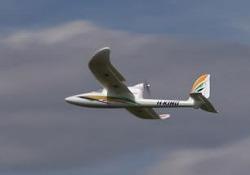
Fitting this S8R receiver into a Phoenix 1600 as a test bed before putting another receiver into something more exotic.
So using the TX I flashed the S8R with the new firmware. Now in the lua scripts there is the option of Quick Mode. :woohoo: Followed the instructions given here Setting Up S8R/S6R Updated and it works. The only exception I have made is the Self Test/Initialise is on a two position switch well away from my fingers but just needs three quick flicks to start Test.
Fitting this S8R receiver into a Phoenix 1600 as a test bed before putting another receiver into something more exotic.
Last edit: 07 Jan 2018 14:08 by Phil Ford.
Please Log in or Create an account to join the conversation.
- Phil Ford
-
Topic Author
- Offline
- Moderator
-
Less
More
- Posts: 3156
- Thank you received: 903
07 Jan 2018 18:04 - 07 Jan 2018 18:38 #15300
by Phil Ford
Replied by Phil Ford on topic Open TX
I have since discovered something odd.  I have placed the RX into the plane and after completing the self check it appears to operate the servos in stabilise mode and Auto level but if I switch it off the rudder throw over to one side.
There does not seem to be hardly any "solved the issue" threads at present except the link I gave. I'll reflash the RX tomorrow just in case the file did not write correctly although the lua script on the TX is fine.
I have placed the RX into the plane and after completing the self check it appears to operate the servos in stabilise mode and Auto level but if I switch it off the rudder throw over to one side. There does not seem to be hardly any "solved the issue" threads at present except the link I gave. I'll reflash the RX tomorrow just in case the file did not write correctly although the lua script on the TX is fine.
Last edit: 07 Jan 2018 18:38 by Phil Ford.
Please Log in or Create an account to join the conversation.
- John Bannister
-
- Offline
- Senior Member
-

Less
More
- Posts: 153
- Thank you received: 98
07 Jan 2018 18:59 #15302
by John Bannister
Replied by John Bannister on topic Open TX
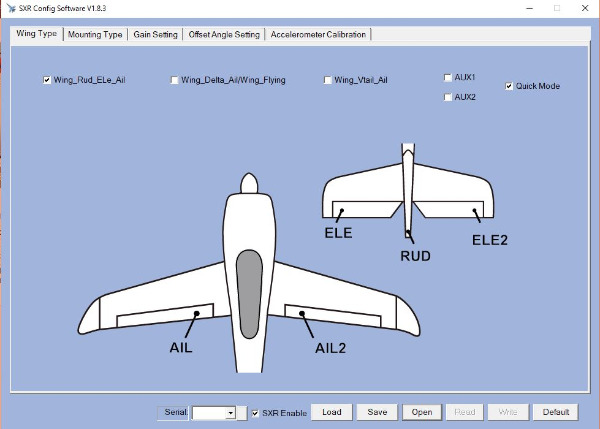
Phil If you used sxr config tool to configure and calibrate did you tick the box "quick mode" if not its expecting something on channel 11.
Also when in the plane after the self test did you move the stick and pot and switches to their full extremities after the blue light went .out
Try doing the self test again .
Also when in the plane after the self test did you move the stick and pot and switches to their full extremities after the blue light went .out
Try doing the self test again .
Please Log in or Create an account to join the conversation.
- John Bannister
-
- Offline
- Senior Member
-
Less
More
- Posts: 153
- Thank you received: 98
08 Jan 2018 07:44 #15303
by John Bannister
Replied by John Bannister on topic Open TX
Phil to do the self test you need to operate the switch controlling channel 12 3 times in 3 seconds and the plane will jump all over the table and the blue light flashes quite scary. In flight you can use the switch to self level if you loose orientation. recommended to use momentary switch. First time I tried I thought I'd done self test by just switching on channel 12, When I finally operated the switch correctly elevator didn't work , that's when I found out about moving sticks, worth the effort when you see how good it is. you will need to check surfaces move in right direction in stab mode.
Please Log in or Create an account to join the conversation.
Moderators: DaveBright
Time to create page: 0.394 seconds
Latest Posts
- No posts to display.
©
2009 - 2026
WMAC PCF Design